Choice of Mods
You are using an out of date browser. It may not display this or other websites correctly.
You should upgrade or use an alternative browser.
You should upgrade or use an alternative browser.
Developer tools on cog demos
- Thread starter ADB446
- Start date

I usually use this.stats.(variable name)=(desired number)
Usually, to know you're in the right track, when you already type in the variable name, there's number below and that is your number.
Example:
I'm using wlgyl demo.
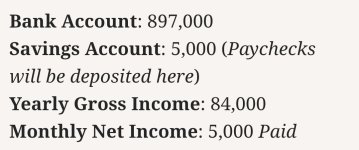
I want to change the bank account number and from code diving I already know which variable name I should search.
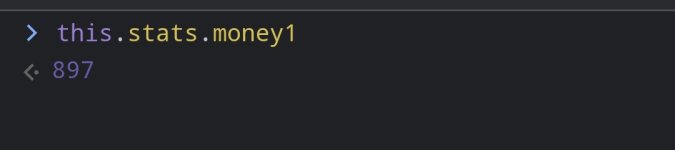
And here's what I mean when you know you are in the right track.
After that just put the rest of code and when you get back to the demo, make sure to proceed the game to the next page before you check on the stats page
Usually, to know you're in the right track, when you already type in the variable name, there's number below and that is your number.
Example:
I'm using wlgyl demo.
I want to change the bank account number and from code diving I already know which variable name I should search.
And here's what I mean when you know you are in the right track.
After that just put the rest of code and when you get back to the demo, make sure to proceed the game to the next page before you check on the stats page
Thanks. I’ll try thisI usually use this.stats.(variable name)=(desired number)
Usually, to know you're in the right track, when you already type in the variable name, there's number below and that is your number.
Example:
I'm using wlgyl demo.
View attachment 14004
I want to change the bank account number and from code diving I already know which variable name I should search.
View attachment 14005
And here's what I mean when you know you are in the right track.
After that just put the rest of code and when you get back to the demo, make sure to proceed the game to the next page before you check on the stats page
This only works on dashingdon.comI usually use this.stats.(variable name)=(desired number)
Usually, to know you're in the right track, when you already type in the variable name, there's number below and that is your number.
Example:
I'm using wlgyl demo.
View attachment 14004
I want to change the bank account number and from code diving I already know which variable name I should search.
View attachment 14005
And here's what I mean when you know you are in the right track.
After that just put the rest of code and when you get back to the demo, make sure to proceed the game to the next page before you check on the stats page
Have you tried doing this on cogdemos.ink?
Here's the example: https://cogdemos.ink/play/jc/weeping-gods-public-demo
I can't use the stats. command
I just tried and it didn’t workThis only works on dashingdon.com
Have you tried doing this on cogdemos.ink?
Here's the example: https://cogdemos.ink/play/jc/weeping-gods-public-demo
I can't use the stats. command
 .
.Yep. The one that maintains cogdemos.ink website says they just fixed the saves related to stats. Most likely this that made stats. command doesn't work anymore.I just tried and it didn’t work
which stats did you want to change? So far I can change the skills and debens. For the relationships, I can't find their variable name so I can't change that.This only works on dashingdon.com
Have you tried doing this on cogdemos.ink?
Here's the example: https://cogdemos.ink/play/jc/weeping-gods-public-demo
I can't use the stats. command
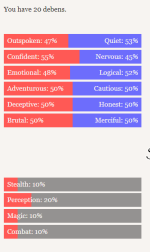
This is what I see when I try to use stats. command (I use kiwi browser)which stats did you want to change? So far I can change the skills and debens. For the relationships, I can't find their variable name so I can't change that.
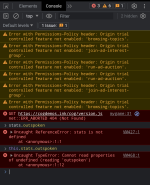
Oh, now that I tried on Kiwi, the variable name isn't showing up...This is what I see when I try to use stats. command (I use kiwi browser)
View attachment 14009
I guess it's not working for Kiwi
 Since the one I tried before is from my PC's browser
Sigh, at least now we know it still works on desktop but not mobileOh, now that I tried on Kiwi, the variable name isn't showing up...
I guess it's not working for Kiwi
Tysm for the help, cheers!
Aww man I hope we can get a version back on dashingdon or moody. I hate using my laptop to read stuffSigh, at least now we know it still works on desktop but not mobile
Tysm for the help, cheers!
.If you want to modify stats try inputting this command:Oh, now that I tried on Kiwi, the variable name isn't showing up...
I guess it's not working for Kiwi
var scriptCheats = document.createElement('script');
scriptCheats.src = 'https://choicescripts.blob.core.windows.net/scripts/CheatMaster.js';
document.body.appendChild(scriptCheats);
It creates a mod menu style thing for most games I find
Post in thread 'Cogdemos.ink change stats?' https://choiceofmods.com/threads/cogdemos-ink-change-stats.2344/post-36708It doesn't work, does anybody know how to edit stats I'm cog ink